Do you want to add images as choices for Radio Buttons or Checkboxes fields within Gravity Forms (or Survey, Quiz, Product and Options)? With this plugin you can add images without having to paste HTML code inside your Form Fields. And it produces beautifully styled and easily adaptable css styling.
Simply add a checkbox or radio button in Gravity Forms
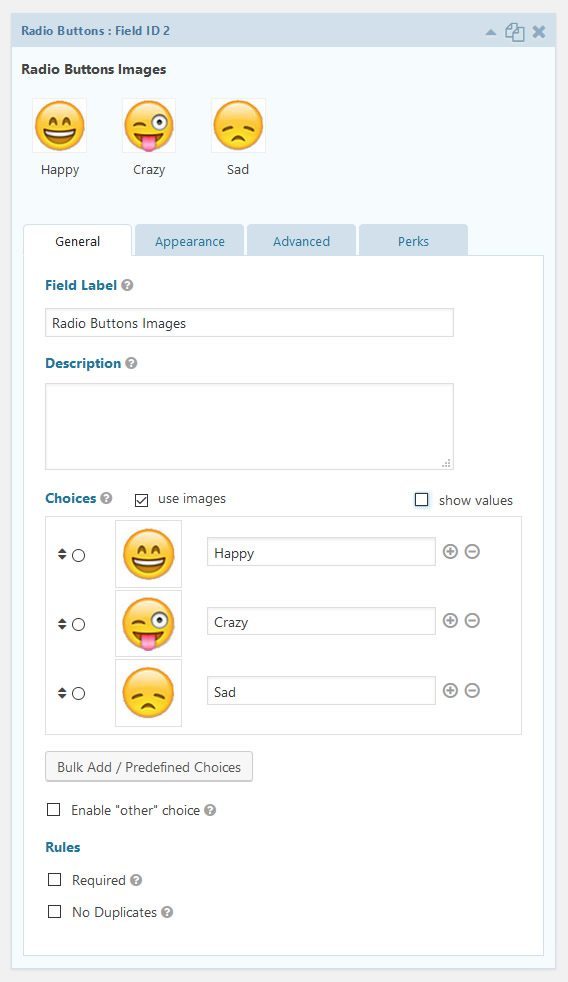
See here how it works in the back-end. Click on ‘Use images’ and you can upload directly to the choice. See here how you can do that in GF2.5 and later:


In GF2.4 and earlier
Styling your radio button or checkbox images
JetSloth provides some very nice tutorials how to change the styling of your images, with very nice hover effects.


Our Premium add-ons for Gravity Forms

Entry to Database
Integrates Gravity Forms with internal or external databases, offering flexible mapping of form fields to database columns and real-time synchronization between entries and database rows.

Field to Entries
Create entries based on Checkboxes & Multi Select choices & List Field rows.

List Datepicker
Add a Datepicker with calendar select to a column or multiple columns in a Gravity Forms List Field.

API Connector
Connect Gravity Forms to External API's: Query the API using form field values and automatically fill other form fields with the API response.
Read tutorials about

How to Validate Repeatable Contact Rows in Gravity Forms
Learn how to validate repeatable Gravity Forms List field rows with GravityWP List Text. This tutorial shows how to add email and regex validation, test invalid values, and confirm that valid team roster data is stored correctly.

Gravity Forms Airtable Integration: Create Records From Form Submissions
Learn how to build a Gravity Forms Airtable integration with GravityWP API Connector. Send form submissions to Airtable, create new records automatically, and save the returned Airtable Record ID and response back to Gravity Forms.

Gravity Forms Asana Integration: Create Tasks From Form Submissions
Learn how to connect Gravity Forms to Asana with GravityWP API Connector. This tested workflow creates Asana tasks from form submissions and saves the returned task ID and URL back to Gravity Forms.

Gravity Forms Google Calendar Integration: Create Events From Form Submissions
Connect Gravity Forms to Google Calendar with GravityWP API Connector. Learn how to create calendar events from form submissions, map event details, configure OAuth 2.0, handle time zones, and save the returned Event ID and URL.

